
ReallyCare make use of open data wherever possible within Plait. This FAQ has hints about how to find the data you want, and in some cases how to add data that isn't there.
GPs, practices, branches and dispensaries
We obtain our GP data from the NHS - part of a service they call Organisation Data Service (ODS). You can search via GP surname:

practice (or branch) name:
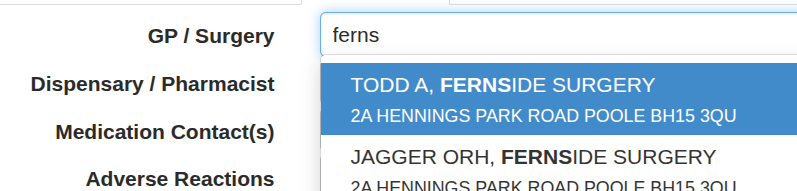
or postcode:
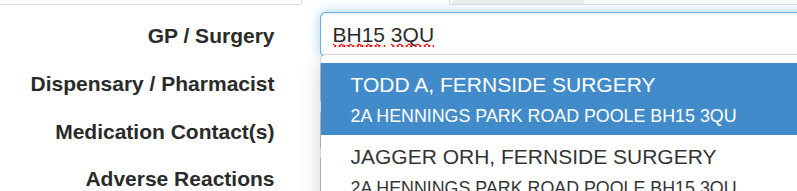
You can even search by a combination of GP name and surgery:

Searching for dispensary is the same, but with out the GP name option.
Clearly, searching for a name like Smith or Khan across the whole of the NHS GP database or Boots as a dispensary will give too many hits, so the system only searches within the selected radius of the organisation position (configured on the Setup tab of the Organisation form, as shown below)
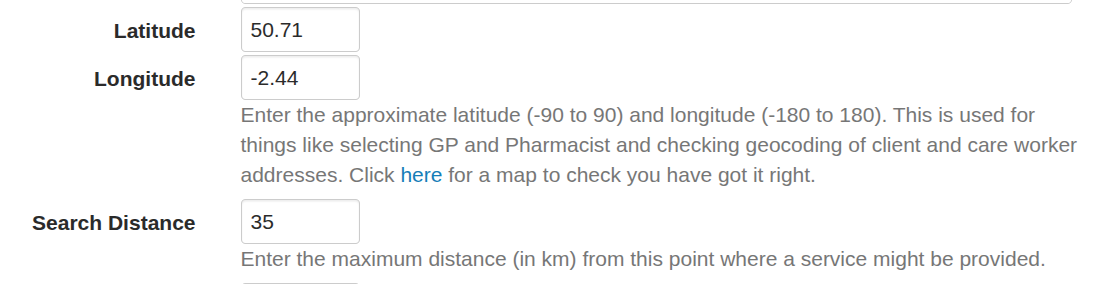
The system makes the information from the ODS database available, including telephone number. If you find that the system is missing a telephone number, GP or even practice there are two possibilities:
- The ODS database is incomplete
- Our periodic copy of the data is out of date
You can check for yourself whether the ODS is missing a practice, branch or is out of date by looking on their website: https://www.odsdatasearchandexport.nhs.uk/ (though data that is present in the ODS data, such as some phone numbers, is not surfaced by this site).
If you suspect that the ODS is incorrect / incomplete, then you need to ask the organisation concerned to get the data updated by getting their nominated contact (or Authorised Signatory) to contact the NHS BSA. They may find the information below helpful:
GP Practices
Change request forms for GP Practice codes and Cost Centres (including new practice codes, change of name/address for existing practice codes, mergers and closures) are available on the NHS BSA Prescription Services website (link below), and should be emailed to prescriptioninformation@
https://www.nhsbsa.nhs.uk/
Depending on the nature of the change, you may also need to separately notify PCSE (for example, for a practice merger/closure, or a change to the Performer list). Please refer to the PCSE website for further information: https://pcse.england.nhs.uk/
Pharmacies
Pharmacy data is managed and supplied to the ODS team weekly by the NHS Prescription Service (NHS RxS); the ODS Team publish this data on their behalf.
The NHS RxS are informed of data changes by Authorised Signatories, who can be contacted via their NHS England Team https://www.england.nhs.uk/primary-care/pharmacy/pharmacy-contract-teams/
Medication
Medication data comes from the Dictionary of Medicines and Devices (DM+D). The primary purpose of this database is for the billing of prescribed medications, and adult social care providers need to record many over the counter medications which are not on the DM+D database (which is the NHS standard that is being imposed on adult social care providers). The NHS are aware that this is unsatisfactory and are considering solutions, but this is likely to be a multi-year process.
Search for a medication by typing in one or more words or part words of the medication name. For example search PARACE 500 TAB to find a 500mg Paracetamol tablet - just typing PARACETAMOL would swamp you.
One common problem in searching is around units - be aware that mcg is the same as microgram, and mg is the same as milligram.
You can search for the medication on the DM+D at https://dmd-browser.nhsbsa.nhs.uk/ - you can search there using the number on the barcode on a medication.
If data really is missing send URL of the med from Boots or similar and we will add to the database.
Geographical and Routing Data
All geographical and routing data comes from the Open Street Map database, which we copy every few months (less frequently than medicones and health organisations). If you cannot find a sensible route you should first of all see if you can get the results you expect on the Project OSRM site. If you can the ask us to update our routing data (it may take a day or two). If you can't, then it is likely that the OSM data is not up to date - you can edit the OSM data yourself - start here.